




Description
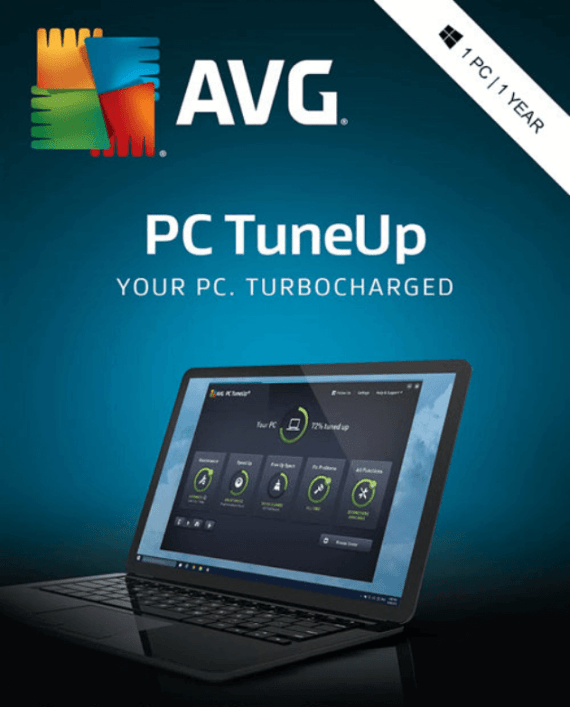
AVG TuneUp – The Complete PC Optimization Suite | Genuine License Key
Is your PC slow, cluttered, and taking forever to boot? AVG TuneUp fixes that — automatically.
AVG TuneUp is one of the most comprehensive PC optimization suites available, developed by AVG Technologies (an Avast company). It cleans junk files, removes bloatware, puts resource-hungry apps to sleep, repairs your registry, and keeps your system running at peak performance — all in the background, with minimal effort required.
At OfficeLicense.shop, we deliver 100% genuine AVG TuneUp license keys to your inbox within minutes of purchase. Activate directly through AVG’s official servers — no cracks, no risks, no complications.
→ Get Your AVG TuneUp License Key Now
Product Details
| Software | AVG TuneUp (latest version) |
| Developer | AVG Technologies (Avast company) |
| License type | Annual subscription |
| Devices covered | 1 PC (multi-device options available) |
| Format | Digital activation code – instant email delivery |
| Platform | Windows, macOS, Android |
| Language | Multilingual |
| Internet required | For activation and cloud-based features |
| Free trial | 7-day trial available from AVG |
What Does AVG TuneUp Do? The Complete Feature Breakdown
AVG TuneUp goes far beyond basic “empty your Recycle Bin” cleanup. Here’s a complete look at every tool included:
Sleep Mode (Patented Technology)
AVG TuneUp’s most powerful and unique feature. Sleep Mode automatically identifies programs that are running in the background and consuming CPU, RAM, and disk resources — even when you’re not using them — and puts them into hibernation.
The result: more processing power for the apps you’re actively using, faster startup times, and less memory pressure throughout the day. When you need a sleeping app, it wakes up instantly. You get all the benefits of having fewer programs running without uninstalling anything.
One-Click Maintenance
AVG TuneUp’s dashboard provides a single-click solution that runs a full system health check and fixes the most common performance issues automatically. No technical knowledge required — one click covers disk cleaning, registry repair, and startup optimization in one pass.
Automatic Maintenance (24/7)
Enable automatic maintenance and AVG TuneUp works continuously in the background — running weekly tune-ups, clearing junk, and fixing registry issues without any intervention from you. Your PC stays optimized even if you forget to run it manually.
Deep Disk Cleaner
Removes junk files that standard cleanup tools miss entirely:
- Temporary Windows system files
- Browser cache, cookies, and history (Chrome, Firefox, Edge, Opera)
- Leftover data from uninstalled programs
- Windows Update residual files
- Log files and error reports
- Thumbnail caches
On an average PC, AVG TuneUp typically frees up several gigabytes of disk space on first run.
Duplicate Finder
Scans your entire hard drive for duplicate files — identical photos, music tracks, documents, and downloads taking up space twice (or more). Identifies them clearly and lets you choose which copies to delete safely.
Software Updater
Automatically scans your installed applications for outdated versions and updates them — either with notification or fully automatically in the background. Outdated software is one of the most common security vulnerabilities; Software Updater addresses this without you having to remember to check.
Startup Optimizer
Identifies and disables programs that launch automatically at startup — many of which you’ve never consciously chosen to run at boot. Reducing startup programs is one of the most impactful ways to speed up boot time and improve system responsiveness immediately after login.
Registry Cleaner & Repair
Scans the Windows Registry for orphaned keys, broken references, and accumulated errors left behind by uninstalled software and system changes. Cleans and repairs registry issues that cause crashes, freezes, and system instability over time.
Software Uninstaller (Bloatware Removal)
Scans all installed programs and rates them by usefulness — flagging pre-installed manufacturer bloatware, trialware, and software you’ve never used. Provides a clean, organized view of everything on your system with one-click uninstall.
Disk Doctor
Scans your drives for filesystem errors and bad sectors, reports what needs attention, and recommends corrective action. Catches disk issues before they cause data loss.
File Shredder
Permanently and irreversibly deletes sensitive files — overwriting them so they cannot be recovered by any data recovery tool. Essential for securely disposing of financial documents, personal data, or confidential files before selling or disposing of a PC.
Browser Cleaner
Clears accumulated browser data across all major browsers — cache, cookies, browsing history, saved form data — freeing up disk space and eliminating tracking data. Covers Chrome, Firefox, Edge, Opera, and more.
Battery Optimizer (Laptops)
Extends battery life on laptops by intelligently reducing background processes, adjusting display settings, and managing power consumption — giving you more unplugged time per charge.
System Information & Performance Monitor
Provides a comprehensive dashboard of your PC’s hardware and software specifications — CPU, RAM, storage, running processes, and system health — giving you full visibility into what’s happening on your machine at any time.
Registry Editor (Advanced Users)
A full-featured Registry Editor for power users and IT professionals who need direct access to the Windows Registry for manual troubleshooting and customization.
AVG Cleaner for Android
The AVG TuneUp subscription includes AVG Cleaner for Android — a mobile companion app that clears junk files, browser history, app cache, and old call/message conversations to free up storage and improve performance on Android devices.
Software Updater for Mac (macOS)
On macOS, AVG TuneUp provides a dedicated Software Updater that scans for outdated Mac applications and updates them automatically — keeping your Mac secure and running on the latest versions.
Who Is AVG TuneUp For?
| User Type | Why AVG TuneUp Helps |
|---|---|
| Everyday home users | Automatic maintenance keeps PCs fast without technical effort |
| Users with older hardware | Sleep Mode and deep cleaning can dramatically extend the usable life of aging PCs |
| Laptop users | Battery optimizer delivers real-world extra battery life per charge |
| Privacy-conscious users | Browser cleaner and File Shredder remove tracking data and sensitive files permanently |
| Small business owners | Software Updater keeps all business software patched and secure automatically |
| IT professionals | Registry Editor, Disk Doctor, System Info panel, and bloatware removal speed up machine setup and management |
| Gamers | Sleep Mode pushes more CPU and RAM to active games by hibernating background processes |
AVG TuneUp vs. Competitors: How It Compares
| Feature | AVG TuneUp | CCleaner Pro | IObit Advanced SystemCare |
|---|---|---|---|
| Sleep Mode (app hibernation) | ✅ Patented | ❌ | ❌ |
| Automatic 24/7 maintenance | ✅ | Limited | ✅ |
| Software Updater | ✅ | ❌ | ✅ |
| Duplicate File Finder | ✅ | ❌ | ✅ |
| Battery Optimizer | ✅ | ❌ | Limited |
| Android companion app | ✅ | ❌ | ❌ |
| macOS support | ✅ | ✅ | ❌ |
| File Shredder | ✅ | ✅ | ✅ |
| Registry Editor (advanced) | ✅ | ❌ | ✅ |
| Disk Doctor | ✅ | ❌ | ✅ |
| Brand reputation | ✅ AVG/Avast (global) | ✅ Piriform/Avast | ⭐ Smaller brand |
| Price at OfficeLicense.shop | Best price → | — | — |
AVG TuneUp’s patented Sleep Mode is genuinely unique — no direct equivalent exists in CCleaner Pro or most competing products. It’s the single feature that delivers the most consistent, noticeable performance improvement on everyday systems.
System Requirements
| Windows | macOS | Android | |
|---|---|---|---|
| OS version | Windows 7 SP1 / 8 / 8.1 / 10 / 11 | macOS 10.12 (Sierra) or later | Android 5.0 or later |
| RAM | 512 MB minimum (1 GB recommended) | 1 GB minimum | N/A |
| Storage | 500 MB available | 500 MB available | 50 MB available |
| Internet | Required for activation & Software Updater | Required for activation | Required |
How to Activate Your AVG TuneUp License Key
Getting started takes less than five minutes:
Step 1 — Purchase & receive your activation code Complete your order at OfficeLicense.shop. Your AVG TuneUp activation code is delivered to your inbox within minutes.
Step 2 — Download AVG TuneUp Visit avg.com/code — AVG’s official activation and download portal.
Step 3 — Enter your activation code Type or paste your activation code into the field on the AVG portal and click Activate.
Step 4 — Create or log in to your AVG account Sign in to your existing AVG MyAccount, or create a free one. Your license is linked to your account for easy management.
Step 5 — Install & start optimizing Download and install AVG TuneUp from your AVG account. Launch the app, run your first scan, and let it get to work.
Need help? Our support team is available to guide you through activation at no extra charge.
Why Buy Your AVG TuneUp License from OfficeLicense.shop?
✓ 100% genuine AVG license — activated directly through AVG’s official servers at avg.com/code.
✓ Instant digital delivery — your activation code reaches your inbox within minutes of purchase.
✓ Prices well below AVG’s official retail — the same genuine product at a significantly lower cost.
✓ Global, region-free — works worldwide with no geographic restrictions.
✓ Real support — our team helps you activate and is available if anything goes wrong.
Frequently Asked Questions
What is AVG TuneUp?
AVG TuneUp is a PC optimization suite developed by AVG Technologies (part of Avast), one of the world’s largest cybersecurity companies. It automatically cleans junk files, repairs registry errors, manages startup programs, hibernates resource-hungry background apps (via Sleep Mode), updates outdated software, and optimizes battery life — keeping Windows PCs, Macs, and Android devices running fast and efficiently.
Is AVG TuneUp safe to use?
Yes. AVG TuneUp is developed by AVG Technologies, a globally recognized and trusted cybersecurity company with hundreds of millions of users worldwide. It is entirely safe to install and run. Unlike unknown “PC optimizer” tools, AVG TuneUp has a transparent, well-documented history and is available through official retail channels.
Does AVG TuneUp actually make your PC faster?
For most users — particularly those with older hardware, many installed programs, or PCs that have never been cleaned — yes, meaningfully so. Sleep Mode alone can have a significant impact by reclaiming CPU and RAM from background processes. Deep disk cleaning and startup optimization also deliver noticeable improvements. Results vary depending on your hardware and how cluttered your system is.
What is Sleep Mode in AVG TuneUp?
Sleep Mode is AVG TuneUp’s patented technology that identifies programs running in the background — consuming CPU, RAM, and disk resources — and automatically puts them into a hibernation state. The apps are still installed and accessible, but they stop consuming resources until you actively open them. This is one of the most effective ways to improve everyday PC performance without uninstalling software.
Does AVG TuneUp work on Windows 11?
Yes. AVG TuneUp is fully compatible with Windows 11, as well as Windows 10, 8.1, 8, and 7 SP1.
Does AVG TuneUp include Mac and Android support?
Yes. An AVG TuneUp subscription includes AVG Cleaner for Android (junk removal, cache cleaning, app management) and Software Updater for macOS. Coverage across platforms is included in a single license — check the specific plan you choose for device limits.
What is the difference between AVG TuneUp and AVG Antivirus?
AVG TuneUp is a performance optimization tool — it cleans, speeds up, and maintains your system. AVG Antivirus is a security tool — it detects and removes malware and protects against threats. They are complementary products. For complete protection and performance, AVG also offers AVG Ultimate, which bundles both AVG TuneUp and AVG Internet Security in one subscription.
Can I try AVG TuneUp before buying?
Yes. AVG offers a 7-day free trial — no credit card required. After the trial period, a valid license key is required to continue using premium features.
Stop Living with a Slow PC — Get AVG TuneUp Today
A cluttered, slow PC is one of the most frustrating everyday computing experiences — and it’s entirely fixable. AVG TuneUp handles everything automatically: cleaning junk, hibernating resource hogs, repairing registry errors, updating software, and optimizing your battery — so you don’t have to think about it.
Genuine license. Instant delivery. The best price available.
→ Buy AVG TuneUp at OfficeLicense.shop
Questions about your license or the activation process? Chat with us directly on WhatsApp — we’re here to help you get set up fast. Plus, enjoy an exclusive 30% off all products when you order through WhatsApp!
Are you a reseller?
If you’re a reseller, mail us at Support@officelicense.shop and we’ll send you a tailor-made price list. Let’s work together!
Find more Products in officelicense.shop
Windows Operating Systems: Windows 11 – Windows 10 – Windows 8
Microsoft Office Suites: Office 2021 – Office 2019 – Office 2016 – Office for Mac
Antivirus: Kaspersky – ESET – Avast – AVG









Jackson (verified owner) –
Easy even for me to install. Well done thanks
Paul (verified owner) –
it works and full explained steps, thank you
Tyler (verified owner) –
Prices are great, Instructions to install all were easy to follow
Mason (verified owner) –
Prices are great, Instructions to install all were easy to follow
Samuel (verified owner) –
Good service.
Kayden (verified owner) –
Easy even for me to install. Well done thanks
Ryan (verified owner) –
Very fast delivery.
Kevin (verified owner) –
Prices are great, Instructions to install all were easy to follow